


.jpg)
If you've ever typed "Pinterest scraper" into a search engine, you already know what you're looking for: a reliable, scalable way to pull Pinterest data and put it to work. For trend research, competitor monitoring, or feeding an AI pipeline, the end goal is always the same — clean, usable Pinterest data, delivered consistently.
What differs wildly is the path people take to start scraping Pinterest.
Some reach for a scraper. Others discover that a purpose-built API was the smarter move all along. This article walks through both paths: what they actually look like in practice, where scraping breaks down, and which tool is a better fit to scrape Pinterest.

Short Overview
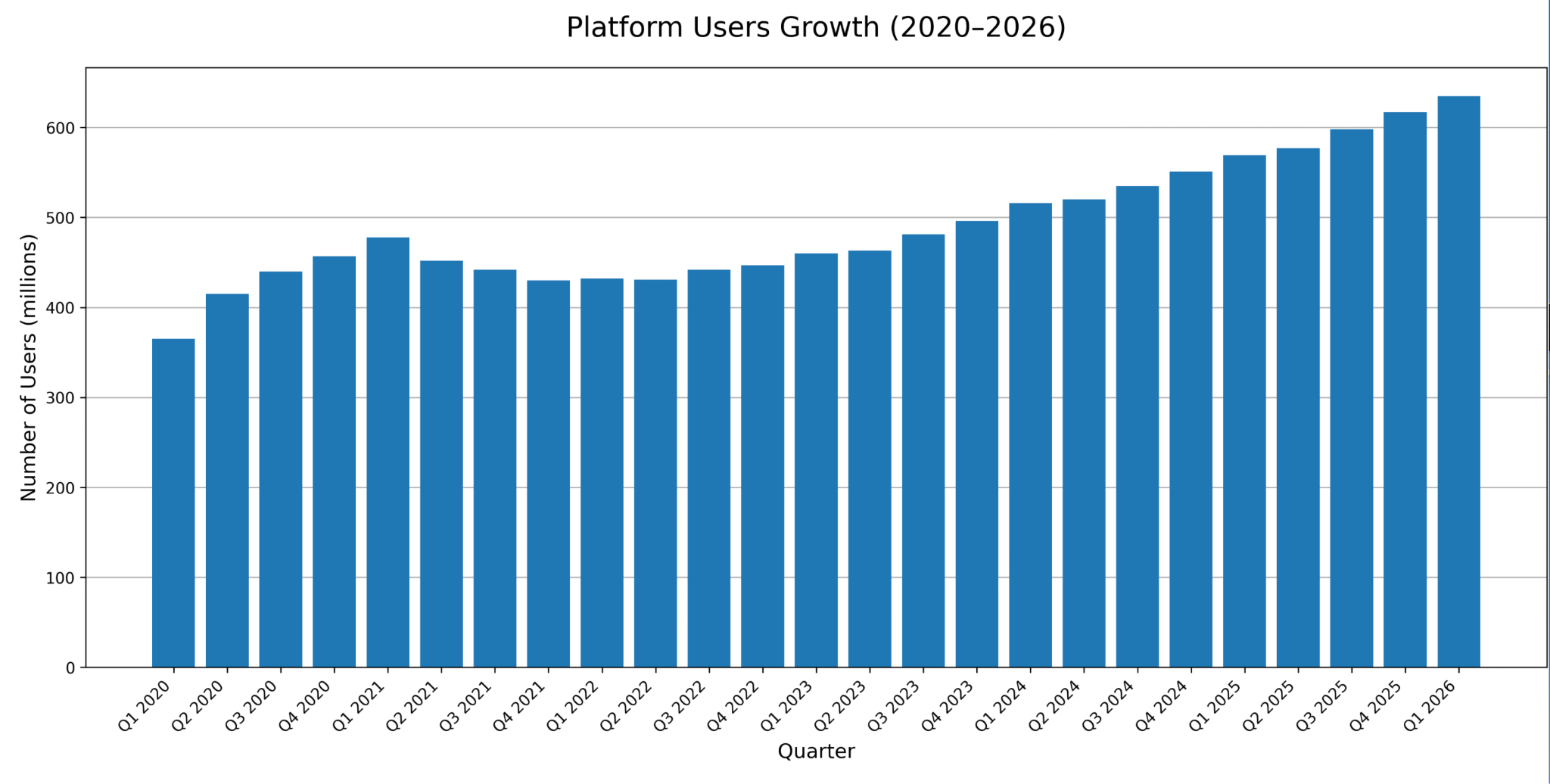
- Pinterest's official Q4 2025 earnings report recorded 619 million monthly active users and 14% revenue growth, making it a data source too significant for any serious market researcher, trend analyst, or content strategist to ignore.
- All three common scraping approaches (manual scripts, open-source tools, and third-party services) parse Pinterest's front-end HTML, meaning every platform update breaks them.
- Pinterest scrapers mimic browser behavior to extract platform data; it has a low barrier to entry, but Pinterest actively counters automated actions, which makes it hard to achieve real scale.
- Automating a scraper into a bot doesn't fix the problem: it scales it, bringing higher detection risk, heavier infrastructure, and steeper ongoing costs with it.
- A Social Media API by Data365 delivers the same Pinterest data cleaner, faster, and more reliably, but without the engineering overhead, unpredictable costs, or operational fragility of scrapers.
Pinterest Scraper: Why Developers Reach for It First
A Pinterest scraper is a program that extracts data from Pinterest by simulating how a browser or user interacts with the platform. Under the hood, it typically works through one of three mechanisms:
- parsing the raw HTML of Pinterest pages
- intercepting HTTP requests to capture data before it renders
- running a headless browser like Puppeteer or Playwright to execute JavaScript and scrape the resulting DOM
There are powerful use cases that drive businesses toward Pinterest scraping. Ideas spreading across the platform need to be tracked to see which visual content is gaining traction, what competitors are pinning, and which accounts hold influence in a category.
Pinterest, with its 619 million monthly active users as of Q4 2025 and a 14% growth rate, is simply too significant a data source to ignore (especially for brands operating in fashion, home, beauty, food, and lifestyle verticals where the platform dominates.)
So why does a scraper feel like the natural first instinct? Because the barrier to entry is low. A developer can write a basic script in an afternoon, point it at a Pinterest URL, and start pulling data within hours — no approval process, no API keys, no waiting. For a quick, one-time data grab, it can feel like it works.
The trouble starts the moment you need it to keep working.
Ways to Scrape Pinterest and Why Most of Them Break
There are three main routes developers take when they decide to fetch Pinterest data, so let’s break down each one.
- Manual scripts are custom Python or Node.js code snippets that hit Pinterest URLs and parse the response.
- External scraper services are independent tools that handle the scraping infrastructure on your behalf, abstracting away the technical complexity for a subscription fee.
- Official or third-party APIs are structured interfaces that provide direct, documented access to platform data without infrastructure management and simulated browser behavior required.
The comparison table below breaks down the functionality features of each tool so you can choose if you want to try Pinterest scraping or opt straight for stable API retrieval, for example, with Data365 Social Media API.
The table tells a clear story: the further you move from a manual script toward a structured API, the more reliable, scalable, and cost-predictable your data pipeline becomes.
So, if you’re not settling for less and want to go straight to a functional way to retrieve Pinterest data, Data365 is here to serve you. Book a call with us, get your personal token and docs, and start pulling out the information you need.
The next logical step many developers take is automating the scraping process entirely by turning it into a bot. And that's where things get significantly more complicated.
Pinterest Scrape Bot: How Automation Makes Things Harder, Not Easier
When a scraper alone isn't fast enough, the logical next step seems to be turning it into a bot: automating the scraping process so it runs continuously, at scale, without human intervention. A Pinterest scrape bot does exactly this — it fires off requests in parallel, navigates pages automatically, and tries to harvest data in bulk.
The problem is that everything that was already difficult about scraping becomes dramatically harder when you add automation.
Pinterest's bot detection systems are tuned to identify exactly this kind of behavior. Unusual request volumes, non-human navigation patterns, repeated access from the same IP, and suspicious session timing are all signals that trigger detection. The moment a bot is flagged, the consequences escalate: IP blocks, account suspensions, CAPTCHAs that interrupt the pipeline, and increasingly aggressive fingerprinting that makes rotating to a new identity harder each time.
The engineering overhead is not trivial. Industry data suggests that maintaining a scraping bot at scale requires the equivalent of 5 to 10 hours of engineering time per week just for upkeep — reacting to detection patterns, fixing broken flows, and adjusting to platform changes. That's before you account for the actual infrastructure running it.
Compare that to an API call that returns structured, clean, reliably formatted data in minutes — and the complexity starts to look less like a challenge to solve and more like a problem to avoid entirely. The Data365 Social Media API three-step retrieval flow is a good example of what that simplicity looks like when it's built for production. Let’s see it in action.
Pinterest Scraping Automation: What Reliable Pinterest Data Retrieval Actually Looks Like
Every business that relies on Pinterest data needs the same thing from its pipeline: a process that runs consistently, returns clean results, and doesn’t require an engineer on standby. That’s not what Pinterest scraping automation delivers, but it’s exactly what a well-structured API does.
Data365 Social Media API uses a simple three-step flow to retrieve public Pinterest pin data. Here’s what it looks like in practice:
1. Update data via POST request
https://data365.co/pinterest/post/1234567891012345/update?access_token=TOKEN2. Check the status of the task with GET request
https://data365.co/pinterest/post/1234567891012345/update?access_token=TOKEN3. Pull out the results via GET request
https://data365.co/pinterest/post/1234567891012345?access_token=TOKENHere’s how a successful response looks like:
{
  "data": {
    "id": "1234567891012345",
    "created_time": "2019-08-24T14:15:22Z",
    "timestamp": 1743008446,
    "state": "EXIST",
    "title": "Here you will see the post title.",
    "text": "Here you will see the post text.",
    "description": "Here you will see the post description.",
    "category": "art",
    "attached_image_url": "Here you will see all image URL attached to the post.",
    "attached_video": "Here you will see all video URL attached to the post.",
    "pinner": {
      "id": "1234567812345678",
      "username": "username_example",
      "full_name": "John Black"
    },
    "pin_join": [
      {
        "name": "Art",
        "url": "https://www.pinterest.com/ideas/art/"
      }
    ],
    "board": {
      "id": "5678123456781234",
      "owner_id": "1234567812345678",
      "name": "Board name",
      "url": "https://www.pinterest.com/art/",
      "image_url": "http://example.com/image.jpg",
      "section_count": 1,
      "pin_count": 123456789,
      "modified_at": "2019-08-24T14:15:22Z"
    },
    "sponsorship": "string",
    "is_promoted": true,
    "is_repin": true,
    "favorite_user_count": 20,
    "reaction_count": 84
  },
  "error": null,
  "_comment": "This sample shows how the API works with Pinterest, but we also provide data from Facebook, Instagram, Twitter, TikTok, Reddit, and Threads. Social media rules often change, so contact us to learn what data is available. We provide any public info that doesn't require login.",
  "status": "ok"
}
The response comes back as clean, consistently structured JSON with pin metadata, engagement metrics, public profiledetails in one predictable payload. No parsing, no broken fields, no surprises.
What can you build on top of it? That’s where it gets interesting. Once the data flows reliably, the automation possibilities are entirely up to you.
- Trend monitoring dashboard
Schedule daily API calls across a set of target pins or competitor boards, pipe the engagement metrics into a tool like Tableau or Google Looker Studio, and you have a live visual intelligence dashboard that updates itself.
- Competitor content tracker
Set up a lightweight Python script that pulls public pin data from competitor profiles on a weekly cadence, stores the results in a database, and flags any pin that crosses an engagement threshold. You get an early signal on what’s resonating in your niche before it becomes a trend everyone else is already chasing.
- E-commerce performance monitor
83% of Pinterest users have made a purchase based on content they discovered on the platform — making pin engagement a meaningful proxy for purchase intent. Connect the API response to your product catalog and you can automatically correlate pin saves and click data with SKU performance, giving your merchandising team a direct line from Pinterest activity to inventory decisions.
The point isn’t that these workflows are complex to build — it’s that they’re only possible when the data underneath them is stable and predictable. A scraper can’t give you that. An API can.
So, which team are you in: a scraper or an API one? If you want to pull fresh Pinterest data consistently, quickly and reliably, don’t hesitate to reach out to us now. We’ll discuss all the details on your specific project and come up with the best solution.
Extract data from top social media networks with Data365 API
Request a free 14-day trial and get 20+ data types




.svg)
.svg)
.svg)


.svg)
.svg)
.svg)
