


Your integration returns posts from a Facebook Page you manage. Then a customer asks for the same data from 100 public Pages your company does not control. The endpoint hasn't changed. The permissions have.
That distinction can decide your architecture before you write the first production request. Meta Graph API supports authorized account management, publishing, ads, and selected public-content use cases. It does not mean every publicly visible Facebook post is available to every developer app.
Later on, you'll find a Data365 credit example for 100 Pages, so you can estimate usage rather than guess.
Last reviewed: October 21, 2026. Access, limits, and pricing change often, so confirm them in the Meta changelog1 and the Data365 documentation before deploying.
Meta Graph API: the decision in 60 seconds
- v26.0 is the current version. v20.0 was removed on September 24, 2026. Next in line is v21.0, on January 21, 2027.
- Pricing: Meta does not publish a standard per-call fee for ordinary Graph API requests. WhatsApp Business messaging has a separate message-based pricing model; development and maintenance still have costs.
- Limits are formulas tied to your audience: 200 × daily active users per hour for the app, 4,800 × engaged users per 24 hours for a Page.
- Standard Access is designed for app-role users; permissions for broader external use may require Advanced Access and App Review. Business Verification requirements depend on the feature and use case.
- Public posts from Pages you don't manage need Page Public Content Access2 and its own review.
- Third-party public-data APIs can retrieve supported publicly accessible Facebook data without requiring you to register your own Meta app; they cannot publish or access private content.
For a Page you administer, Meta's official permissions and publishing tools are usually the starting point. For read-only monitoring of Pages you do not manage, check Page Public Content Access and compare the field coverage of independent providers. Neither path guarantees every requested public post or metric.
Before you build: three checks that change the answer
- Do you administer the Page, or are you collecting from Pages you do not control?
- Do you need to publish, manage ads, or only read public content?
- Can your selected API return the exact fields for a representative set of target Pages?
If the third check fails, a larger quota will not solve the problem. If you only need to read public posts from Pages you don't manage, jump to “Meta Graph API vs a Third-Party Social Data API” below.
What Is the Meta Graph API?
Meta's Graph API, also called the Facebook Graph API, is the native tool for working with Facebook and Instagram data in code. Requests go to graph.facebook.com (apps built on Instagram Login use graph.instagram.com), with the version number at the start of the path, and every response comes back as JSON. Its nodes, edges and fields represent objects, their connections, and their properties.
Nodes, edges, and fields
Graph API requests use three building blocks:
Specify fields to request the properties you need. Fields you omit will not appear in the response.
curl -G "https://graph.facebook.com/v26.0/PAGE-ID/posts" \
  --data-urlencode "fields=id,message,created_time" \
  --data-urlencode "access_token=PAGE-ACCESS-TOKEN"
Which Meta APIs run on the Graph API
Several products share the platform and its version numbers. The Pages API reads and publishes on Pages you manage. The Instagram Platform covers Business and Creator accounts and comes in two flavors, with Facebook Login or with Instagram Login (our Instagram Graph API tutorial explains the split). The Marketing API runs ads, and the WhatsApp Business Platform handles messaging. They share version numbers, though not always expiry dates or rate limits, which matters later.
Current Graph API Version (v26.0) and Version Lifecycle
The current Meta Graph API version is v26.0, released July 29, 20263.
Graph API versions have a limited support window, but do not assume every endpoint follows a single retirement date. Check Meta’s Versions table and out-of-cycle changelog before planning a migration. A versioned URL cannot protect an integration from changes Meta applies across versions.
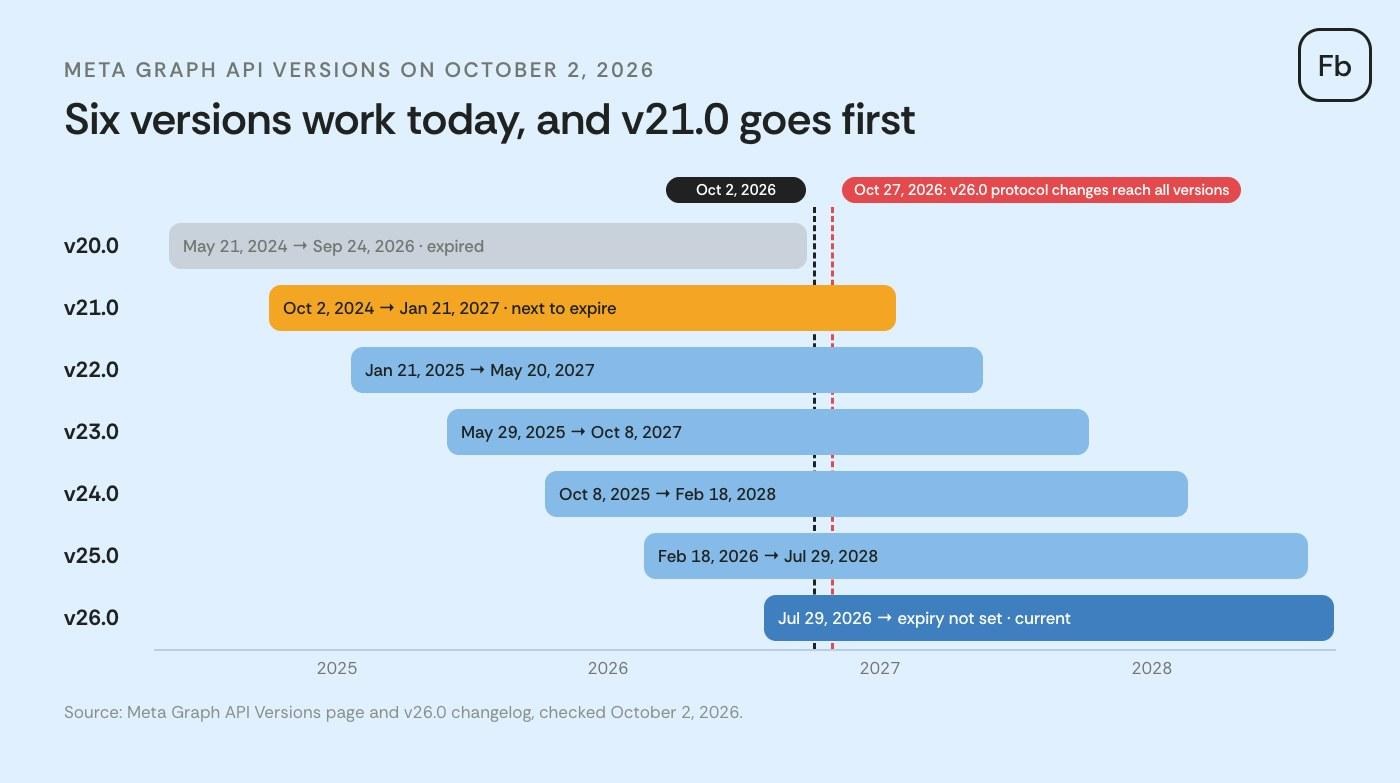
The Marketing API keeps its own calendar on the same Versions page: Marketing API v24.0 expired on October 6, 2026, more than a year before Graph API v24.0 will. And the individual changelog pages still say "Available until TBD", so trust the Versions table for dates.
What changed in v26.0
v26.0 drops five legacy protocol behaviors4. They apply to v26.0 calls now and to every remaining version from October 27, 2026:
pretty is ignored.debug is ignored.date_format: the request returns an error, so convert dates in your own code.- Root requests like
GET /?ids=A,Bfail too. Meta points you to per-object requests or batch requests. If-None-Matchis ignored, and every call returns the full response.
The rest hits narrower groups. The Commerce Order Management API is on its way out (47 endpoints, blocked on v26.0 now and on all versions from October 27, 2026, no replacement). Five legacy fields on New Pages Experience Pages now return a version error. For history: v22.0 was the release that moved Instagram to the IG User and IG Media endpoints and dropped metrics like plays and clips_replays_count, which came off every version on April 21, 2025.
If your product publishes posts, manages ads, or accesses authorized account insights, version testing is part of maintenance. If it only reads supported public content, first determine whether the official permissions path is appropriate for your team.
How to check and upgrade your app's API version
Put the version in every request path, then confirm it in the facebook-api-version response header.
What a tokenless test showed (October 1, 2026)
Two requests to the Meta Graph API returned different version headers:
GET /v26.0/me
→ facebook-api-version: v26.0
→ Error 2500: An active access token must be used to query information about the current user.

GET /v27.0/me
→ facebook-api-version: v21.0
→ Error: Unknown path components: /me
At the time of testing, v27.0 did not exist, yet the request did not return an invalid-version error. Instead, the response reported v21.0, the oldest version still available.
What this means for your integration: Don't rely on the version in your request URL alone. Log the facebook-api-version response header, so a silent fallback to another version doesn't go unnoticed.
To inspect the header yourself:
curl -s -D - -o /dev/null "https://graph.facebook.com/v26.0/me" | grep -i facebook-api-version
# facebook-api-version: v26.0
Responses may change as Meta releases or retires API versions.
To move your app forward, go to Settings > Advanced > Upgrade API Version in the App Dashboard. Meta's upgrade guide also describes the API Upgrade Tool, which lists the calls affected between two versions.
Meta Graph API Rate Limits
The Graph API uses two kinds of limits: Platform Rate Limits for calls made with app and user tokens, and Business Use Case (BUC) limits for the Marketing API, the Instagram Platform and Pages calls made with a Page or system user token. If both could apply, BUC wins. The formulas below come from Meta's rate limiting documentation5.
"Number of Users" means your app's unique daily active users, and it's a cap on the app as a whole. Meta's own example: 100 users give your app 20,000 calls an hour. Ads get their own formulas on the same page. Two Instagram endpoints, Business Discovery and Hashtag Search, count against Platform limits.
To illustrate why small integrations can hit limits earlier than expected, the table below applies Meta’s published formulas to sample audience sizes. Treat the numbers as illustrations, not quotas for your app:
These formulas matter most when an integration has few active users but polls many objects. A small test app can reach its app-level allowance quickly even if the same workflow would fit comfortably at a larger audience size. Inspect the usage headers in real traffic; a formula alone cannot predict the limits of every endpoint.
Rate limit headers
Once an endpoint has seen enough of your traffic, Meta adds usage headers. X-App-Usage carries call_count, total_cputime and total_time, each a whole-number percentage, and throttling may start when CPU or total time reaches 100. X-Business-Use-Case-Usage is keyed by business object ID and adds type and estimated_time_to_regain_access, the wait in minutes. Tokenless test calls didn't return these headers, which fits Meta's note that they appear only after enough calls.
Rate limit error codes
Code 4 means your app hit its limit, 17 means the user did, and 32 means a Pages call made with a user token hit the Page limit. Code 613 is a custom limit. The BUC family runs from 80000 to 80014, for example, 80001 for Pages and 80002 for Instagram. Meta's advice when you see one is blunt: stop calling, because every extra call pushes recovery further out.
How to stay under the limits
Ask for the fields you use, nothing more.
- Subscribe to webhooks for objects you'd otherwise poll; Graph notifies you when a node changes.
- Batch requests save HTTP round trips but not quota. Meta's batch requests page counts every call inside a batch separately, up to 50 per batch.
- When you're throttled, wait the minutes in
estimated_time_to_regain_accessbefore the next call. - For Page Public Content Access, Meta recommends a system user token to avoid rate limiting issues.
Is the Meta Graph API Free? Pricing Explained
Meta doesn't publish a per-call price for ordinary Graph API requests. Meta's overview, rate limiting, access levels, App Review and Business Verification pages (checked October 2026) list no fee per call. So the honest answer to "Meta API pricing" has two parts: no metered price for the API itself, and real costs all around it.
What you actually pay for
A zero per-call price is not a zero-cost integration. Budget for implementing OAuth and token refresh, preparing review materials where required, monitoring usage headers, and testing version upgrades. If your project only needs public data, compare those engineering tasks with the provider's coverage and credit consumption, not with an imaginary Meta per-request fee.
Marketing API Access Tier
You can't buy a bigger Marketing API allowance. On May 4, 2026, Meta renamed "Ads Management Standard Access" to Marketing API Access Tier6: the lower level is now Limited Access and the upper one Full Access. You qualify for Full Access with 500+ Marketing API calls in the past 15 days (down from 1,500) and an error rate under 15% over the last 500 calls. The screen recording requirement is gone.
WhatsApp is the one place in this family where Meta sends a bill. Since July 1, 2025, WhatsApp pricing is per message, charged only when a template message is delivered.
Third-party data providers have separate pricing models. Data365 pricing and credit examples appear below.
How to Get Access: Permissions, App Review, and Business Verification
To access the Meta Graph API, create a developer app, obtain an access token, and request the permissions your integration needs. If only people with a role on the app use it, App Review isn't required. To serve other users, you generally need Advanced Access and the associated review and verification steps.
Development mode vs Live mode
While you build, the app sits in Development mode and works for people with a role on it. Meta's App Review submission guide says to switch to Live mode only after review: in Live mode the app can request only approved permissions, even from your own team, and test posts made in Development mode become visible to everyone.
Standard vs Advanced Access
That split comes from Meta's access levels page7. Permissions are requested one at a time, for example, pages_read_engagement for Pages you manage or instagram_basic for Instagram professional accounts.
What App Review asks for
The submission guide's checklist, condensed:
- A 1024x1024 app icon, a privacy policy URL, a category and a business email.
- At least one successful call with each permission you request, made within 30 days before you submit.
- Screen recordings in 1080p or better, showing a user granting each permission and your app using it. No audio; reviewers won't listen.
- English UI if possible, with captions where the screen isn't self-explanatory.
Your first request
Most Graph API requests require an appropriate access token, including requests for public Page content. A Page being visible in a browser does not make it available through an unauthenticated Graph API request. The error response in the next section illustrates the access boundary; it is not proof that every Page or endpoint responds identically.
Common Graph API Errors and What They Mean
"Permission errors" are the classic Graph API complaint. Every error comes in the same envelope (message, type, code, often error_subcode, plus an fbtrace_id that Meta says expires shortly). The codes you'll meet most, from Meta's error handling guide:
The usual causes map onto those codes. Your app lacks a permission, or the user didn't grant it (10, 200 to 299). The token expired (190). The app is still on Standard Access, so it fails for anyone without a role. Or the field you call was removed in the version you're on, which returns a version error. Here's the response to a tokenless request for public Page posts:
{"error":{"message":"(#200) Provide valid app ID","type":"OAuthException","code":200,"fbtrace_id":"AXnuS7Tq-i2c-ivNmcCBu99"}}Code 2500, returned on the /me calls above, isn't in Meta's error table at all. For token renewal, see our notes on Graph API access token types.
What the Graph API Won't Give You
What limits you is authorization for the exact objects and fields you need, more than request volume. Public visibility, Page management rights, and approved access are different things. Private insights such as reach and impressions for Pages you do not manage are not exposed by Data365 either.
Other people's Pages (Page Public Content Access)
Reading public posts and comments of Pages you don't manage takes Page Public Content Access. It needs App Review and Business Verification, and Meta adds that "you may also need to sign additional contracts". Without it, an app in Live mode can't see any Page public content. Before review, it reads only Pages whose admin also has a role on your app.
Instagram: professional accounts only
The Instagram Platform supports Business and Creator accounts, not personal accounts. The Instagram Basic Display API was discontinued on December 4, 2024. With Facebook Login, Business Discovery can retrieve selected public profile information and metrics from other professional accounts, subject to Meta's access requirements.
Official research access: Meta Content Library
Academic researchers have their own route: the Meta Content Library and API, a controlled-access environment where an application has to be approved by ICPSR or CASD. It's built for research, with analysis inside Meta's Secure Research Environment.
Before choosing an API for cross-Page monitoring, write down four things: the Pages you need, the exact public fields, the refresh interval, and the acceptable level of missing data. Test those requirements on a representative sample. A successful request to one Page does not establish coverage for 100.
Suppose your product tracks posts from 100 public Facebook Pages you do not administer. You need post text, publication time, and comments. Before counting requests, confirm that your chosen access route supports those Pages and fields. Only then calculate call volume, credit usage, and retry behavior.
Meta Graph API vs a Third-Party Social Data API
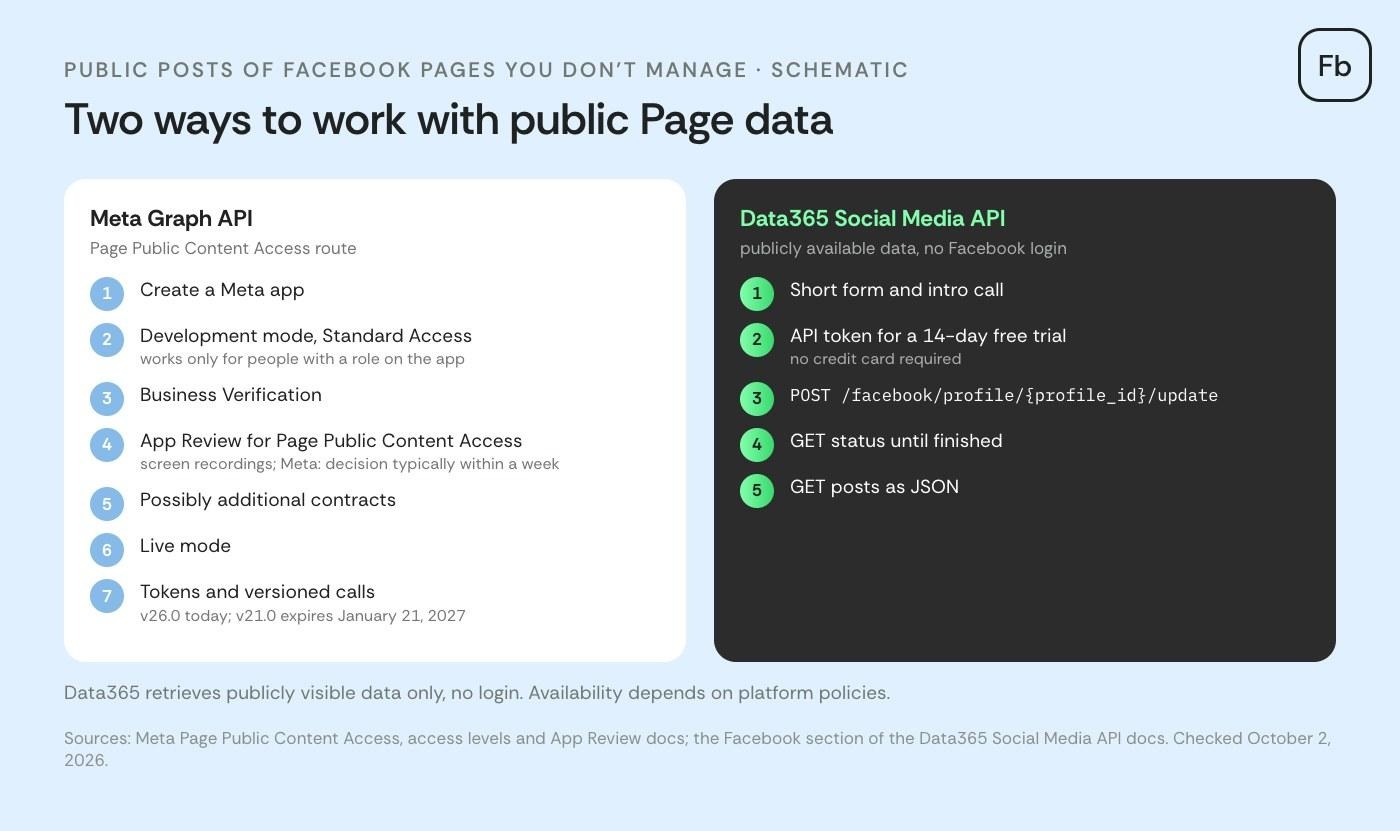
The real difference is who grants access and who maintains the integration. Meta provides the official path for account operations and approved integrations; Data365 provides a separate route for supported public-data retrieval. The table below shows where each fits and what each cannot do.
Which API should you use?
Meta's API is built around permissions for accounts you control. Data365 is built for retrieving supported public data from Facebook and other social networks through one API. Check the available objects and fields before comparing developer effort.
When the Graph API is the right choice
Choose Meta Graph API when you need to publish to Pages you manage, operate ads, read authorized Page Insights, or let users connect accounts through Meta login and permissions. A third-party public-data provider does not replace those workflows.
When a data API is the shorter path
A Data365 proof of concept makes sense when your product needs supported public posts across Pages you do not administer, like the 100-Page monitoring case above. You authenticate with Data365 rather than obtaining Page Public Content Access for your own Meta app. That changes the integration workflow, but it does not remove source-data availability limits or guarantee complete coverage.
- Submit a retrieval task, check its status, then request the results; verify the exact endpoint and fields in the Data365 documentation.
- Credits depend on what you retrieve, so estimate them for your objects and comment volumes rather than treating “one Page” as fixed-cost.
- A small representative sample shows field coverage, response shape and credit consumption before you commit.
For related implementation examples and public-data use cases, see Data365’s Facebook Graph API guide and Facebook engagement API article.
What public Facebook data you get with Data365
For a Facebook monitoring pipeline, start by validating the actual response fields you need: Page identifiers, post text, timestamps, comments, and available engagement indicators. Data365 returns structured results for supported public objects, but individual fields and results depend on source visibility and endpoint support. Check a sample response before designing a database schema around it.
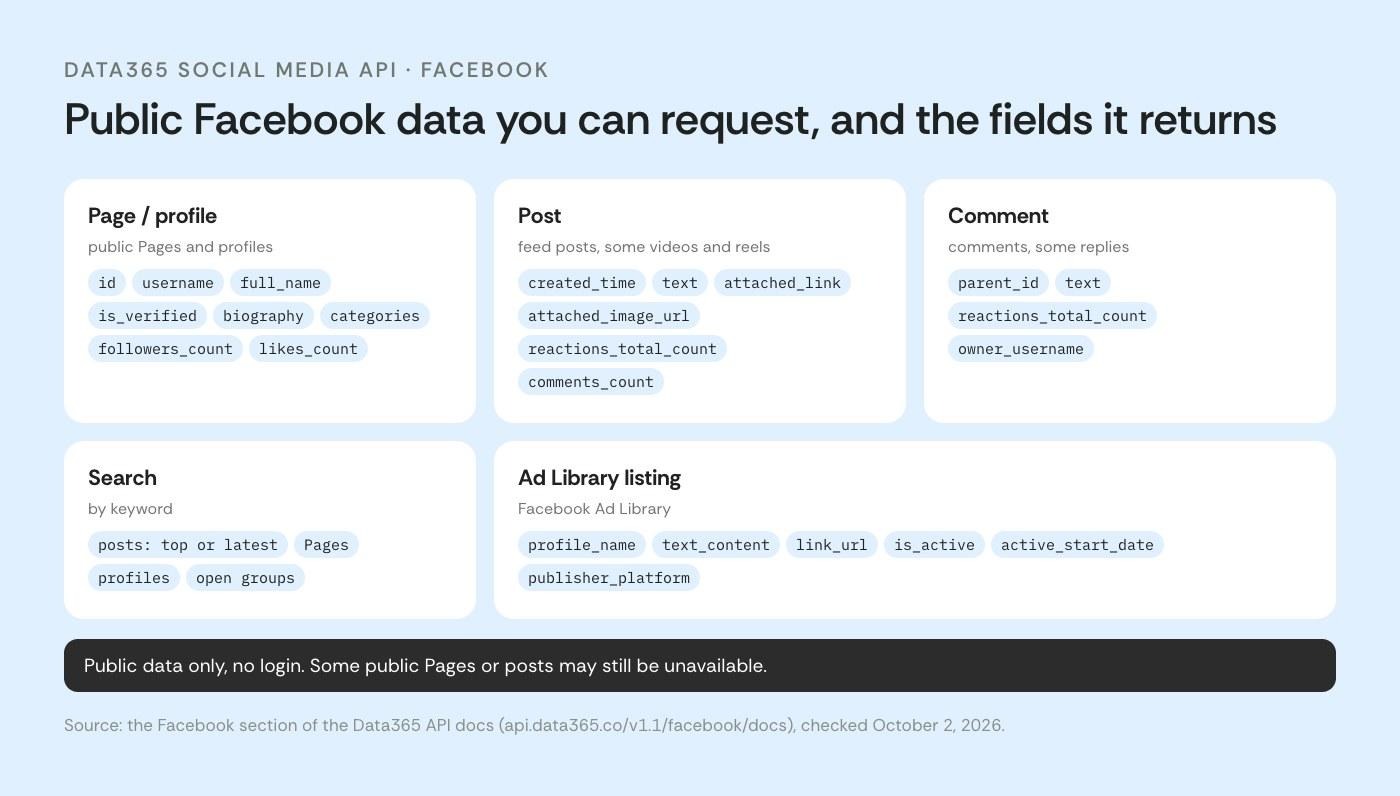
Reaction counts come as totals per reaction type. The same API also covers public Instagram data: public profiles with their posts and reels, comments on them, and like counts. What's reachable on Instagram shifts more often, so ask our team for the current picture before you plan around it.
How a Data365 request works
The Data365 integration follows an asynchronous workflow: POST to initiate collection, GET to check task status, and GET to retrieve the result. Check exact paths and parameters in the Data365 documentation before deploying.
POST request – initiates data collection for the specified profile or query
https://data365.co/facebook/post/1234567891011121314/update?access_token=TOKENGET request (status check) – checks if the data collection is complete
https://data365.co/facebook/post/1234567891011121314/update?access_token=TOKENGET request (data retrieval) – returns the structured result
https://data365.co/facebook/post/1234567891011121314?access_token=TOKENResponse in JSON format
{
  "data": {
    "attached_image_url": "http://example.com/image.jpeg",
    "comments_count": 48,
    "created_time": "2024-02-10T21:00:06",
    "id": "1234567891011121314",
    "owner_id": "1234567890",
    "owner_username": "username_example",
    "owner_full_name": "John Black",
    "post_type": "image",
    "reactions_angry_count": 1,
    "reactions_haha_count": 0,
    "reactions_like_count": 589,
    "reactions_love_count": 46,
    "reactions_sad_count": 0,
    "reactions_support_count": 3,
    "reactions_total_count": 636,
    "reactions_wow_count": 0,
    "shares_count": 19,
    "text": "Here you will see social media post text with all the links included.",
    "text_tagged_users": [
      "123456789011"
    ]
  },
  "_comment": "This sample shows how the API works with Facebook, but we also provide data from Instagram, Twitter, TikTok, Reddit, Threads, and Pinterest. Social media rules often change, so contact us to learn what data is available. We provide any public info that doesn't require login.",
  "error": null,
  "status": "ok"
}Send 10–20 representative Page URLs, the fields you need and your refresh schedule. The team will check coverage and estimate credit usage before you build.
What it costs in credits
Data365 charges credits according to the objects and engagement data retrieved. On Facebook, a profile costs 9 credits and each retrieved post costs 1 credit. Comments or reactors add 1 credit per 10 retrieved items, subject to a 5-credit minimum for a post with engagement retrieved; if no items are retrieved, the post costs 1 credit. Shares are charged at 1 credit per retrieved share, with the same 5-credit minimum when shares are retrieved. A search request costs 7 credits plus the credits for returned posts. Credits are usage units, not a price in euros.
Example: 100 public Facebook Pages, 20 posts per Page, no engagement fetched. Assuming the profile endpoint is used once for each Page and retrieves 20 available posts at 1 credit each, the estimate is 100 × (9 + 20) = 2,900 credits. With 30 retrieved comments on each post, a post costs 5 credits, so the estimate becomes 100 × (9 + 20 × 5) = 10,900 credits. Actual usage depends on successful retrieval, visible results and requested options.
How many credits will your Facebook project use?
Multiply what you plan to retrieve by the credit rates above: 9 per Page profile, 1 per post, and at least 5 per post when you retrieve its comments. Work out one collection run, then multiply by how often you refresh the data. Three typical monthly workloads, assuming each run fetches the Page profile again:
These figures cover profile, post, search and comment credits. Reactions, reactors, shares and other options add to the total, and actual usage depends on which Pages and posts are available.
Your estimate is based on the Pages, posts and comments you selected. Test a representative sample to see which data comes back and how many credits it uses.
For subscription details, see Data365 pricing.
Some publicly visible Pages or posts may be unavailable through Data365 due to source restrictions, privacy settings, or endpoint coverage.
You're responsible for making sure your data collection complies with applicable laws and platform terms. Data365 is an independent company: its Social Media API provides access to publicly available data and isn't affiliated with, endorsed by, or officially connected to Meta Platforms, Inc. or the official Facebook API. The Facebook overview page has the rest of the details.
What's Changing Next
Take future release and sunset dates from Meta’s live Versions table, not from a guessed release cadence.
Pinning a version doesn't shield you from removals Meta applies everywhere at once. Page Insights impressions and page fans metrics8 went on November 15, 2025, after 90 days' notice, and reach metrics followed in mid-2026. Each was announced ahead of time in a changelog or on Meta's developer blog, so subscribe to both.
Meta Graph API or Data365: Which One Fits Your Project?
Meta Graph API is the right starting point for applications that publish content, manage ads, or work with Facebook accounts and Pages through authorized access. Cost isn't the obstacle, since Meta doesn't charge per call. Permissions, rate limits, version changes, and ongoing maintenance take more of your time.
For projects collecting publicly available data from Pages they don't manage, access is the first thing to verify. Page Public Content Access provides an official route, while independent providers such as Data365 offer another option for supported public data.
Whichever approach you choose, test the exact fields and Pages your application needs before estimating the full integration workload. A successful API request confirms that one request worked, not that every target Page or post will be available.
Request access and run a sample of the Pages you need: see which fields come back and how many credits your workload uses.
Resources
- Meta Graph API changelog: https://developers.facebook.com/docs/graph-api/changelog
- Meta, Page Public Content Access: https://developers.facebook.com/docs/features-reference/page-public-content-access
- Meta for Developers blog, Introducing Graph API v26 and Marketing API v26: https://developers.facebook.com/blog/post/2026/07/29/introducing-graph-api-v26-and-marketing-api-v26/
- Meta Graph API v26.0 changelog: https://developers.facebook.com/docs/graph-api/changelog/version26.0
- Meta Graph API rate limiting: https://developers.facebook.com/docs/graph-api/overview/rate-limiting
- Meta for Developers blog, updates to Ads Management Standard Access: https://developers.meta.com/blog/updates-to-ads-management-standard-access-feature/
- Meta Graph API access levels: https://developers.facebook.com/docs/graph-api/overview/access-levels/
- Meta Pages API, deprecated Page Insights metrics: https://developers.facebook.com/documentation/pages-api/platforminsights/page/deprecated-metrics
Extract data from top social media networks with Data365 API
Request a free 14-day trial and get 20+ data types


