On October 7, 2026, an announcement on X said that Grok Bot, xAI’s agent product, can now search X and monitor it on request, with no API key and no developer account. We ran requests on the same three topics through Grok Bot and through regular Grok chat (free and paid), with slightly different prompts for each, and compared the results. Grok Bot returned ten ranked posts in an identical layout every time, and Grok Chat came close on a one-off pull. The gap shows up in automation, and in what neither tool can promise: a complete, repeatable dataset.
Overview
- Grok Bot is an xAI agent that, according to its own description (October 2026), works on its own computer, connects to apps such as Gmail and a calendar, and searches X on request.
- You can also search posts using your usual Grok Chat.
- Grok Bot and Grok Chat each say their X results are incomplete, so a high-engagement post can be missing.
- As of October 2026, Data365 retrieves public X data such as profiles and posts through requests the customer defines, and tweets search happens through keywords or hashtags.
Let’s see what we’ve got.
How we tested the new Grok feature

All posts shown in this article were publicly available at the time of testing. Their inclusion reflects search results and does not imply any association with or endorsement of Data365. If your post appears in this article and you’d like it removed, please contact us at [email protected].
Grok Bot and Grok chat each got the same three topics, with prompts built on one template and tweaked slightly for each tool (there is a difference in how they search that affected the prompt, more on that below). We then put the answers side by side.
The topics were the new Taylor Swift single and the US midterm elections, plus what people on X say about Grok Bot itself, each limited to the last seven days. Every prompt asked for the top 10 posts ranked strictly by engagement, with a fixed set of fields and the full post text, and told the tool not to narrow the topic. Every post ID was opened on X and checked against the quoted text.
Results will differ for other users: Grok adapts to the person asking and to the wording of the prompt, so a different account or day can return different posts.
What Grok Bot returned
Grok Bot returned ten ranked posts on every topic, in the same layout, with exact counts and the full text of each post. Each entry carried the rank, a linked author, the post ID, the date, likes, reposts, replies, views and the quoted text. When fewer than ten posts cleared the 10,000-like threshold, Grok Bot said so, listed those first and placed the rest under a “Below 10,000 likes” divider, which is what the prompt asked for.
On the Taylor Swift prompt, Grok Bot ranked the official @taylornation13 post about the “Patient Zero” acoustic and piano versions second, with 24,437 likes and 4.8 million views. Paid and free Grok Chats had listed it first.
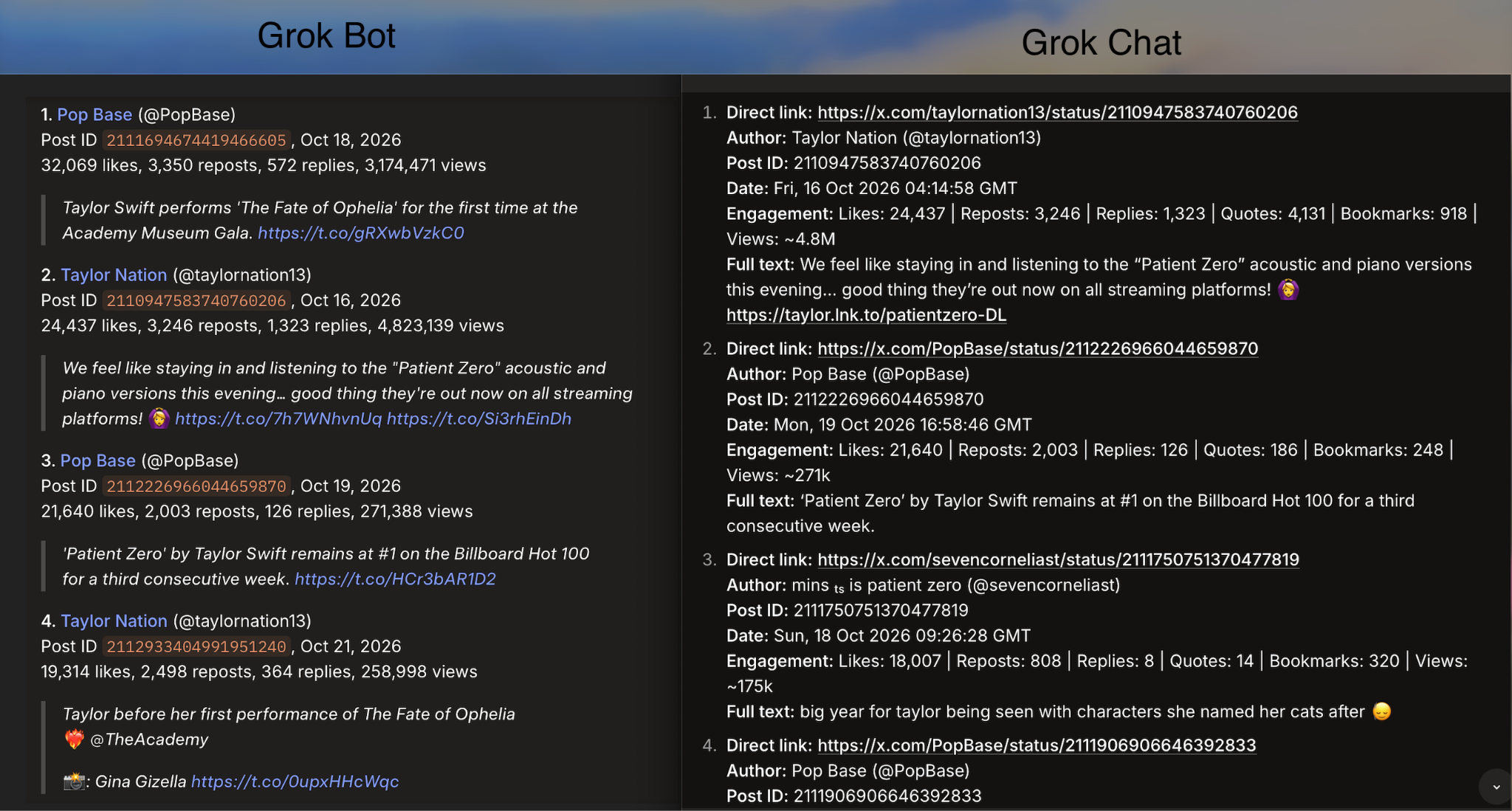
Since we ran the test in parallel, we could point out the difference, and the model that missed a post would add it to its results. For real retrievals, though, this approach only eats your time and leaves you unsure which result is true.
Grok Bot also reported that its X’s search does not support the min_faves operator (Grok Chat can), an X search filter that returns only posts with at least a given number of likes. Grok Bot ran several broad searches, removed duplicates and applied the threshold itself. Two tools from one company describe the mechanism differently, which shows the problem with a query the user cannot see.
On the midterms prompt, all ten posts cleared 10,000 likes. Grok Bot counted six Trump early-voting posts among them and offered to drop the near-duplicates to make room for other voices. If you don’t want it to drop anything, you will have to negotiate with the Agent. And that is the main problem with AI collecting data, in most cases, no prompt can stop it from doing things its way. APIs, in turn, don’t have that ability to decide instead of you.
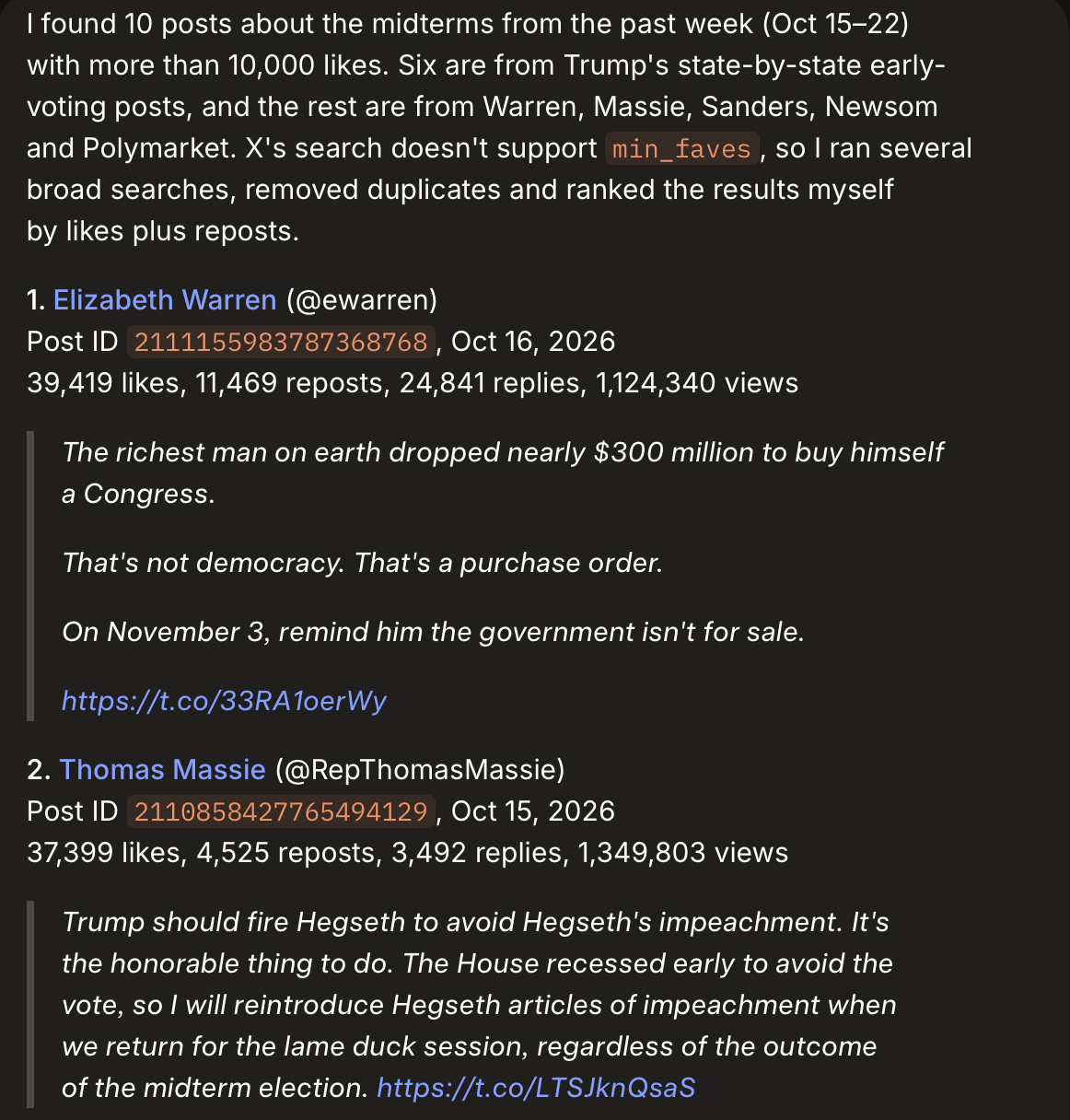
If you need a whole thread with all the comments and visuals, you will have to go post by post (which is almost a half-manual retrieval). There’s no limit for the answer length, but the model itself can’t make such long runs.
Data collection in the age of AI keeps getting new toys, but an AI agent has taste, and a dataset shouldn’t. The classic approach returns what you asked for, not what the agent found interesting.
Grok Bot vs. Grok Chat: one-off pulls and automation
Quick note: our Grok Chat prompt differed from the one we used for the Bot, since it supports min_favs operator.
Grok Chat comes close to Grok Bot for a one-off pull, and Grok Bot adds automation on top. On the Grok Bot topic, both tools led with the same Elon Musk post, and both lists were dominated by Musk. The lists shared 4 of 10 posts.
The layouts differed as well. Grok Chat’s list is not in strict order of likes plus reposts, although Grok Chat said it ranked that way, and some of its counts carried bookmarks and quotes.
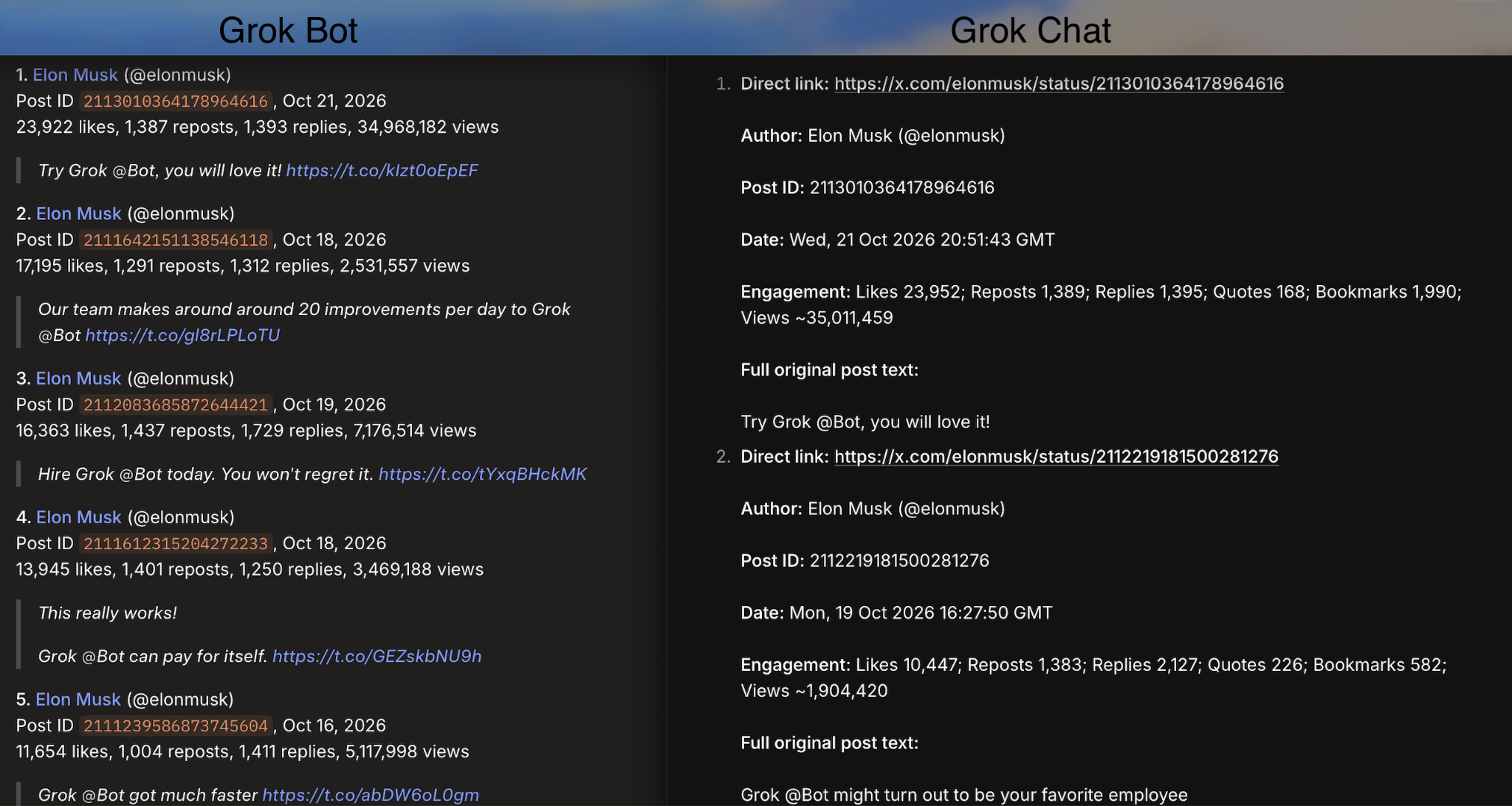
As you might detect from these two screenshots, Grok Chat always has its own way to present data, while the Bot remains consistent (the prompt remained the same during all the runs). However, if the structure doesn’t mean much for your research, you can freely go with the free Chat. During some runs, the free version was even more accurate and provided more additional data.
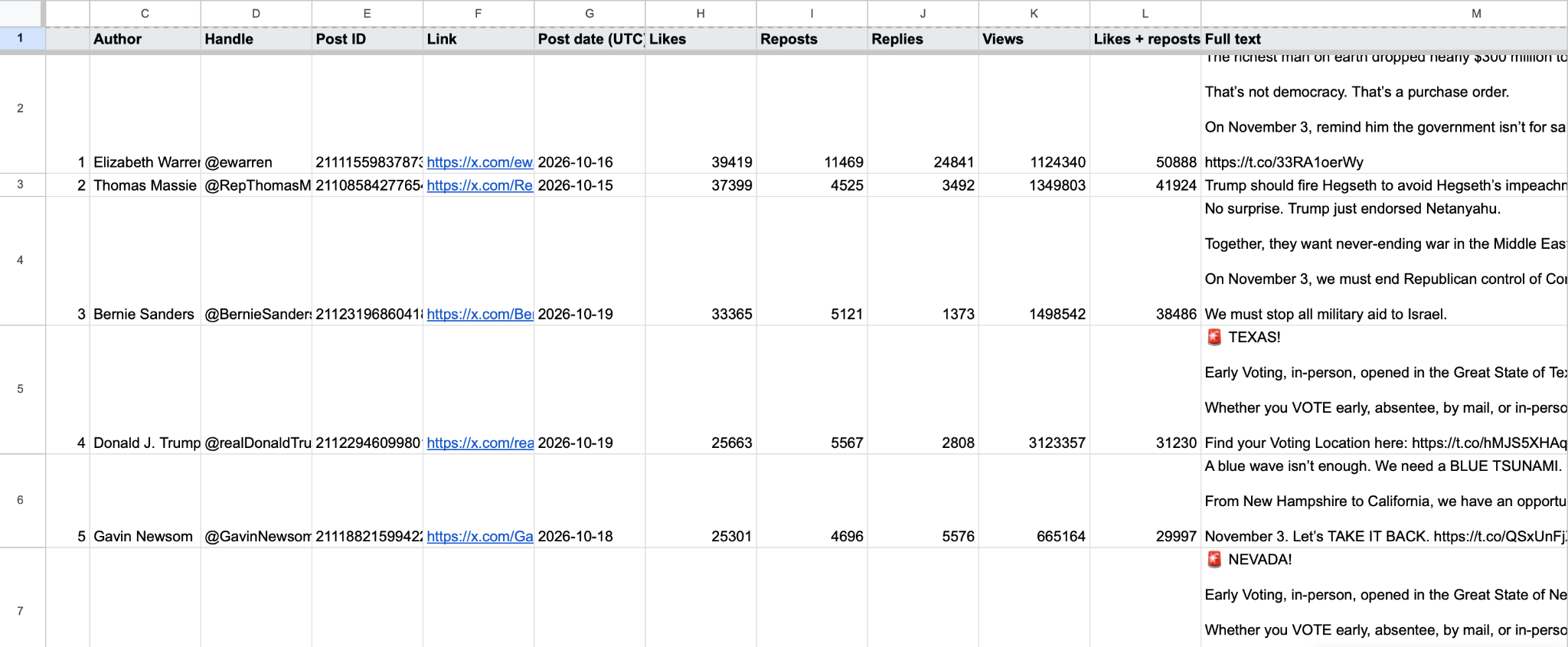
Grok Bot can run the same search every morning, save the results to a spreadsheet or page, and message the user when a post crosses a threshold. It offered a daily search at the end of its first answer, and we tested the scheduling, the spreadsheet export and the alerts.
It was quite easy to set up, and here’s the spreadsheet it created for us:
So far, Grok Bot and Grok Chat both prove themselves to be quite useful for quick and short searches where accuracy isn’t the main concern. Want to see what’s on the surface before you post something yourself? These guys will help. Want to find a post or a pattern that proves you’re right to other X users? Either Grok Bot or Grok chat will do the job.
However, if you want to build something on this data – a report, a strategy, an action plan – better choose something that was built for this task and nothing else – an API.
Grok Bot vs. Grok Chat vs. X API vs. Data365: comparison table
The four tools differ most in who writes the query, how the output is structured and what each tool cannot do. The X API column points to X’s current developer documentation instead of quoting numbers, because plans and limits change. The Grok columns reflect our October 2026 tests, and the Data365 column reflects Data365’s documentation.
Where Grok Bot and Grok Chat stop being enough for data collection
Grok Bot and Grok Chat suit repeated monitoring of a topic, but four requirements of serious data work remain outside what an agent that builds its own sample can promise. Grok Bot said in two of the three tests that its searches return a sample of matching posts, so a high-engagement post can be missing. The layout problem is solved, since a spreadsheet can read Grok Bot’s identical structure. The sample problem is not:
- Repeatability. A client asks in April why March’s numbers differ from the previous quarter, and the analyst needs to rerun the same query and get the same rows.
- Stated coverage. “Public posts from these 200 accounts between these dates” is a sentence an analyst can defend, while “the posts Grok Bot found” is not.
- Volume. A monitoring project needs thousands of posts a day, collected without anyone watching the screen.
- Accountability. When the numbers look wrong, an agent’s best effort does not replace a support team.
Data365 is an API companies use to monitor what people say on social media. Data365 retrieves publicly available data from X and seven other social networks and returns it as structured JSON, in response to requests the customer defines. For X, the public data covers profiles and posts, with counts such as likes, reposts, views and replies.
If your goal is a repeatable collection of public X posts from profiles you name, Data365 gives you structured JSON from a request you define, without the approval process of a developer account. Contact our team to start a 14-day trial and get some real data from X.
Using Grok Bot and Grok Chat for your own research
Grok Bot and Grok Chat both work well for personal research on a topic, provided the prompt removes the tool’s freedom to choose its own angle.
Prompt for Grok Bot searches
Pull the top 10 X posts from the last 7 days about [TOPIC].
- Search broadly: several keyword variants, plus posts from the biggest accounts on this topic (add any you want included: @...).
- What counts: [optional, e.g. "the post itself must mention X"].
- Original posts only, no reposts. Keep posts with 10k+ likes; if fewer than 10 clear that, say so and show the next best.
- Rank by likes + reposts, no duplicates.
- For each: link (https://x.com/username/status/ID), author name and handle, post ID, date, likes, reposts, replies, views, full original text.
Prompt for the Grok Chat searches
Pull the top 10 posts about [TOPIC] from the last [TIME PERIOD].
For each post, include:
- Direct link (https://x.com/username/status/ID)
- Author name and handle
- Post ID
- Date
- Engagement (likes, reposts, replies, views if available)
- Full original post text (do not summarize)
Do not narrow the topic yourself. Do not focus on any sub-angle unless I explicitly ask for it.
Search broadly for the highest-engagement posts discussing the topic.
Rank strictly by engagement (likes + reposts first).
Use high engagement filters (min_faves:10000 or higher).
Deduplicate results across searches if needed.
If there are fewer than 10 strong results, return as many as available and note that.
To use the prompts, follow these steps:
- Replace [TOPIC] and [TIME PERIOD] with the subject and the window to follow, for example the last 7 days.
- Keep the number 10 in the prompt, because Grok Chat’s search tool returns 3 posts when the request sets no limit.
- Lower the engagement threshold for a niche subject, because 10,000 likes suits a global album release and starves smaller topics.
- Ask Grok Bot to repeat the search every morning if the topic needs following; Grok Bot offered this itself after the first answer.
- Open a few of the returned links, because checking them takes a minute and is the only audit trail a user has.
How to choose between Grok Chat, Grok Bot, the X API and Data365
The choice depends less on price than on how often the data is needed and who answers for the sample. Grok Chat and Grok Bot give that role to a model, the X API gives it to the developer, and Data365 gives it to the customer. The practical decision comes down to the job:
- If you need a one-off look at a topic → use Grok Chat, which is free to try and needs no setup.
- If you follow a topic every day and want the same layout in a spreadsheet → use Grok Bot, which repeats the search on a schedule.
- If you need X data through your own developers and can work within the plans and limits in X’s current developer documentation → use the X API.
- If you need repeatable retrieval of public X profiles and posts as structured JSON → use Data365.
Many teams end up using two of these tools: an AI agent to decide what is worth measuring, and a retrieval API to measure it. If your goal is a dataset that matches the request you wrote rather than the sample a model chose, Data365 gives you structured results you can trust, without model preferences in the middle. Start with a 14-day trial today to see how the unbiased data collection works.
Data365™ is an independent company. Our product, Social Media API, provides access to publicly available data but is not affiliated with, endorsed by, or officially connected to X (formerly Twitter), xAI, or Grok. All product and company names mentioned in this article are trademarks of their respective owners and are used for identification and comparison purposes only.
Extract data from top social media networks with Data365 API
Request a free 14-day trial and get 20+ data types