


.jpg)
For a few years now, the browser has been a lousy messenger. iOS privacy prompts, ad blockers, and third-party cookie restrictions have all been chipping away at how much of a customer's journey actually reaches Meta before an ad decision gets made. Facebook Conversion API (Meta calls it the Conversions API, CAPI for short) is the fix Meta built for that specific problem.
CAPI is unique in its own way and can’t be replaced by third-party tools. However, tools like Data365 can support it by enriching what goes to Meta, making your ads more data-driven.

Important: Data365 doesn’t provide a "CAPI event." It can provide social data from which your system identifies an event. Throwing a bit of social-platform data alongside a CAPI implementation can contribute to a qualifying customer event, and the resulting event can be passed to Meta through CAPI.
Quick overview
- What CAPI is: a server-to-server API that sends event data (purchases, leads, sign-ups, offline conversions) straight from an advertiser's server, CRM, or website platform to Meta.
- Why it exists: browser-based tracking alone increasingly misses events, thanks to privacy features, ad blockers, and cookie limits.
- How it works: your server posts structured event data – event name, timestamp, hashed customer identifiers, custom parameters – to a Meta endpoint tied to a dataset.
- Where it stops: CAPI only sends data outward. If your team also needs to pull data back out of Meta – posts, engagement, page or ad insights – that's a different tool.
In this piece, we will break down what CAPI actually does, how to set it up, what a well-formed payload looks like, where it overlaps with the Pixel and Google Tag Manager, and where the whole Meta-owned tracking stack runs into a different problem entirely – one it was never built to solve.
How Facebook Conversion API Actually Works
Strip away the tooling and the process is short: something happens on your site or in your systems – a purchase, a lead form, a sign-up – and that event needs to reach Meta so its ad system can credit the right campaign and learn what's working. There are two ways to make that handoff, and most businesses end up using both at once. One reports from the visitor's browser. The other reports from your server.
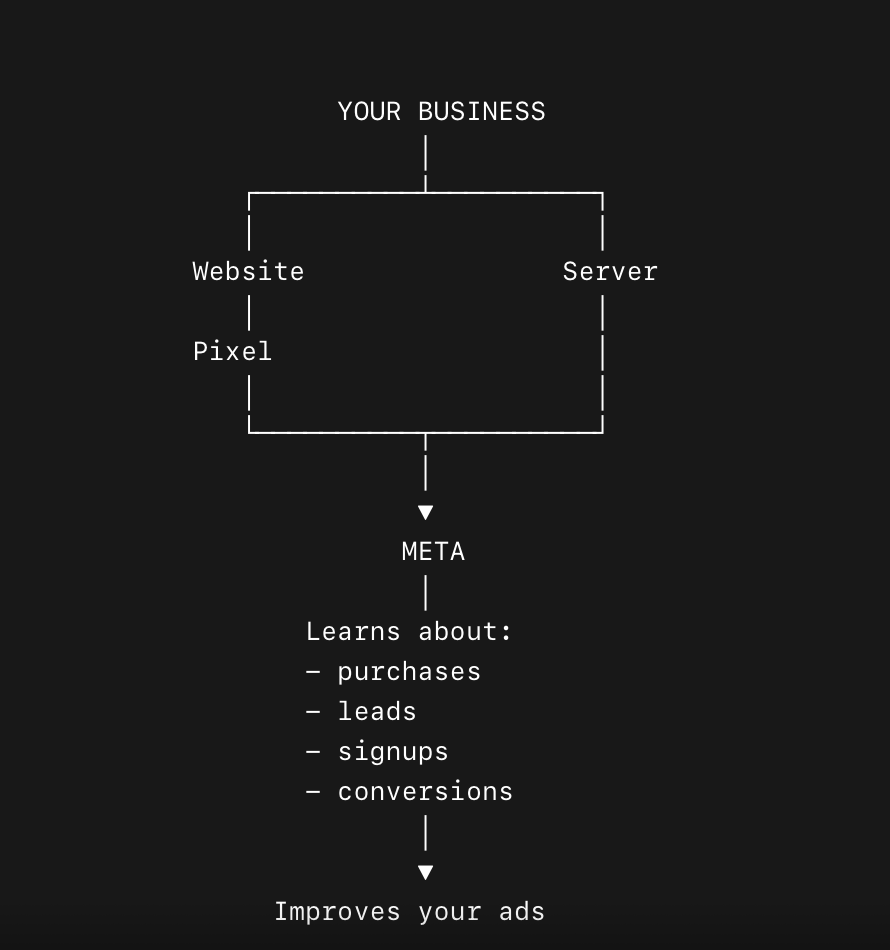
Here's what each one is, and how they fit together.
Where the Pixel Fits
The Meta Pixel is a small piece of JavaScript you drop into your website's code. It sits in the visitor's browser and reports back to Meta whenever something trackable happens – a page view, an add-to-cart, a completed purchase. That's been the default setup for years, and it works fine as long as the browser cooperates: the script has to load, the cookie has to be set, and nothing in between can block the request.
What CAPI Changes
Increasingly, something does block it. CAPI routes around that dependency. Instead of relying on the browser to report an event, your own server sends it directly to Meta – the same server that just processed the payment and already knows, with certainty, that a purchase happened. No script to load, no cookie to set, nothing for an ad blocker or a privacy setting to catch.
Facebook Conversion API vs. Pixel
They're not competitors, but the distinction is easy to blur, so it's worth laying out plainly, now that both have actually been explained:
The honest way to frame it: the Pixel is cheap and easy but increasingly partial. CAPI is more work but far more resilient. Running both and deduplicating properly – as covered above – gets you closer to the full picture than either one delivers alone.
What An Event Actually Contains
Each event you send carries a set of fields:
event_name(Purchase, Lead, CompleteRegistration).event_time.- Hashed pieces of
user_data(email, phone, external ID – always hashed, never sent raw). custom_datafor details like order value or currency.
Events are tied to a dataset, and that same dataset can also collect app events, offline conversions, and business messaging events – one funnel for all of it, rather than a separate pipe per source.
A very short list of details, you might think. Well, you can enrich it a bit to help Meta better understand your business by collecting social media data and using it to build a richer understanding of your customers/audiences inside your own data stack.
With Data365, it might look this way:
- Data365 helps you collect and understand external social signals on Facebook.
- Your own systems turn those signals + first-party data into meaningful business events or customer attributes.
- CAPI sends the supported conversion signals back to Meta.
If you want to give it a try, just contact us. Our team will help you start enriching that data.
Keeping Pixel and CAPI from double-counting

Most setups run Pixel and CAPI side by side, which is what Meta itself recommends. But that means the same real-world conversion can arrive twice – once from the browser, once from your server. Attach a matching event_id to both, and Meta collapses them into one event instead of two. Skip that step, and your numbers inflate: everything looks like it's converting better than it actually is, and nothing shows an error to tell you the truth.
How To Set Up Facebook Conversion API
Before touching CAPI, your Pixel needs to already be live and firing – CAPI is layered on top of it. From there, setup runs through a few concrete steps:
- Confirm access. You'll need Admin-level permissions on the relevant Business Manager account to generate Facebook API tokens.
- Locate your Pixel/dataset ID. It sits at the top of the Pixel's Overview page in Events Manager, and it's the identifier every event you send will reference.
- Generate an access token. Inside Events Manager, under the Pixel's Settings tab, the Conversions API section has a "Generate access token" option. Meta automatically creates the supporting app and system user for you – no App Review, no permission requests, which is unusual generosity by Meta's own standards.
- Choose an integration path. A partner integration (Shopify, a CRM, an agency tool) is the fastest route if one's available for your stack. A direct/manual integration gives you full control over the payload but means your engineering team owns the implementation. A server-side Google Tag Manager container sits between those two, discussed below.
- Send a test event and verify. Events Manager's test tool confirms Meta is receiving events correctly before you rely on them for optimization.
A quick note on the Google Tag Manager route: If your team already lives in GTM, you don't need a from-scratch server build – Meta and Google both maintain tag templates for exactly this. It's covered in full further down, since it's less a "setup step" and more its own decision about where your server-side logic lives.
How To Pass Conversion Data To Facebook's API
Every CAPI event is a POST request to Meta's events endpoint, with a JSON body built around your dataset ID and access token. We're skipping a copy-paste snippet on purpose: the exact shape depends on which path builds it – hand-coded server integration, GTM server container, or partner tool – and a generic example would match none of those exactly.
What matters more than syntax is what has to be true about the data itself:
- Email and phone must arrive SHA-256 hashed and lowercased, never raw. GTM templates typically hash automatically; a hand-rolled integration has to do it itself, and it's the most common place a manual build quietly breaks.
event_idstill has to match its Pixel counterpart exactly for the deduplication described above to fire.- Beyond email and phone, name, a hashed external ID, and location fields count as additional match keys – no fixed cutoff, just more signal the more you can honestly supply. Timing matters too: events land best within minutes of the real action, though Meta's endpoint accepts them up to seven days late.
Events Manager's Test Events tool, using a test_event_code, confirms events are arriving and deduplicating correctly before any of this touches live campaigns – the alternative is finding a broken event_id a month later, in a metrics review instead of a test log.
Even a clean implementation has a ceiling: the fields are only as strong as the identifiers you hashed to begin with. A checkout-form payload stays thinner than one backed by a fuller customer record, which is where pulling in identity data from a CRM or public social profiles via something like Data365 tends to move Event Match Quality more than any tweak to the request itself.
Facebook Conversion API And Google Tag Manager
If your marketing stack already runs through GTM, setting up CAPI there instead of building a standalone server integration is a reasonable shortcut – you're reusing infrastructure you've already got rather than standing up something new.
The setup uses GTM's server-side container, a separate concept from the standard web container most teams already have. Events fire from your website into the web container as usual, get forwarded to a server container you host (on Google Cloud, AWS, or elsewhere), and a Conversions API tag template – maintained by Meta, with community and partner variants also available – reformats those events into the schema CAPI expects and sends them on.
The practical benefit is consolidation: your GA4 events, your ad platform conversions, and your CAPI events can all route through the same server container, which makes debugging and data governance a single job instead of three separate ones. The tradeoff is that someone still has to own that server container – hosting it, monitoring it, keeping the templates current – so it's not entirely "free" infrastructure, just infrastructure you're likely already paying for in another context.
Facebook Conversion API vs. Graph API: Two Different Jobs
This comparison gets asked about constantly, and it's worth being precise about why it's a slightly odd question in the first place: CAPI and the Graph API don't do the same job. CAPI is an outbound channel – it sends conversion events to Meta so Meta's ad system can optimize against them.
The Graph API is largely an inbound channel – it's how a business reads data back from Meta: posts, page and ad insights, engagement metrics, audience information, and more, depending on the endpoint and permissions involved.
Where they end up in the same conversation is context, not competition. A team setting up CAPI is often, at the same time, trying to pull social data into the same marketing stack – audience insights to inform targeting, engagement data to validate what's converting, page-level performance to report on.
That's Graph API territory, and it's sometimes the less pleasant half of working with Meta's developer platform: app review cycles that can stretch for weeks, permission scopes that shift without much warning, and endpoint deprecations that break integrations built only a few versions ago.
Neither tool replaces the other. CAPI still owns the job of getting conversion events into Meta's optimization loop. But if the Graph API side of your stack is the part causing the trouble, that's a solvable problem.
Conclusion
The appeal of CAPI was never that it's an easier technology than the Pixel – it's more work, not less. The appeal is that it puts the reliability of your conversion tracking back in your own hands instead of a browser's. The same logic applies one step further up the stack: the more of the data pipeline you control directly, rather than routing entirely through Meta's own gatekeeping, the less any single platform change can break your setup.
Data365 pulls data across Facebook, Instagram, and other major platforms in real time. For a team that needs reliable audience, engagement, or content data – whether to enrich a CAPI payload, feed a reporting dashboard, or simply avoid re-architecting an integration every time Meta ships a Graph API version bump – it's a calmer way to get that data.
Curious what that looks like for your stack? Start a 14-day free trial!
Extract data from top social media networks with Data365 API
Request a free 14-day trial and get 20+ data types


.svg)
.svg)
.svg)


.svg)
.svg)
.svg)
