


Data365 and Apify both help teams collect public social media data, but they are built on different ideas. Data365 is a single Social Media API: one integration, one credit system, and one team responsible for the pipeline across eight networks.
Apify is a cloud platform best known for Apify Store, a marketplace where thousands of scrapers, called Actors, are published by Apify and independent developers. Below, we compare approaches to see how each handles integration, support, pricing, and sample collection volumes.
Want to skip right to the social media data collection? Schedule a call with the Data365 team and start retrieving now.
Data365 vs Apify: Two Different Approaches to Social Data
The simplest way to frame this comparison: at Data365, we have our own unified product, while Apify runs a platform with a marketplace on top. Both can return public social media data as structured JSON. What differs is the path to that data and who is responsible for each step along the way.
Data365: one API built for social media
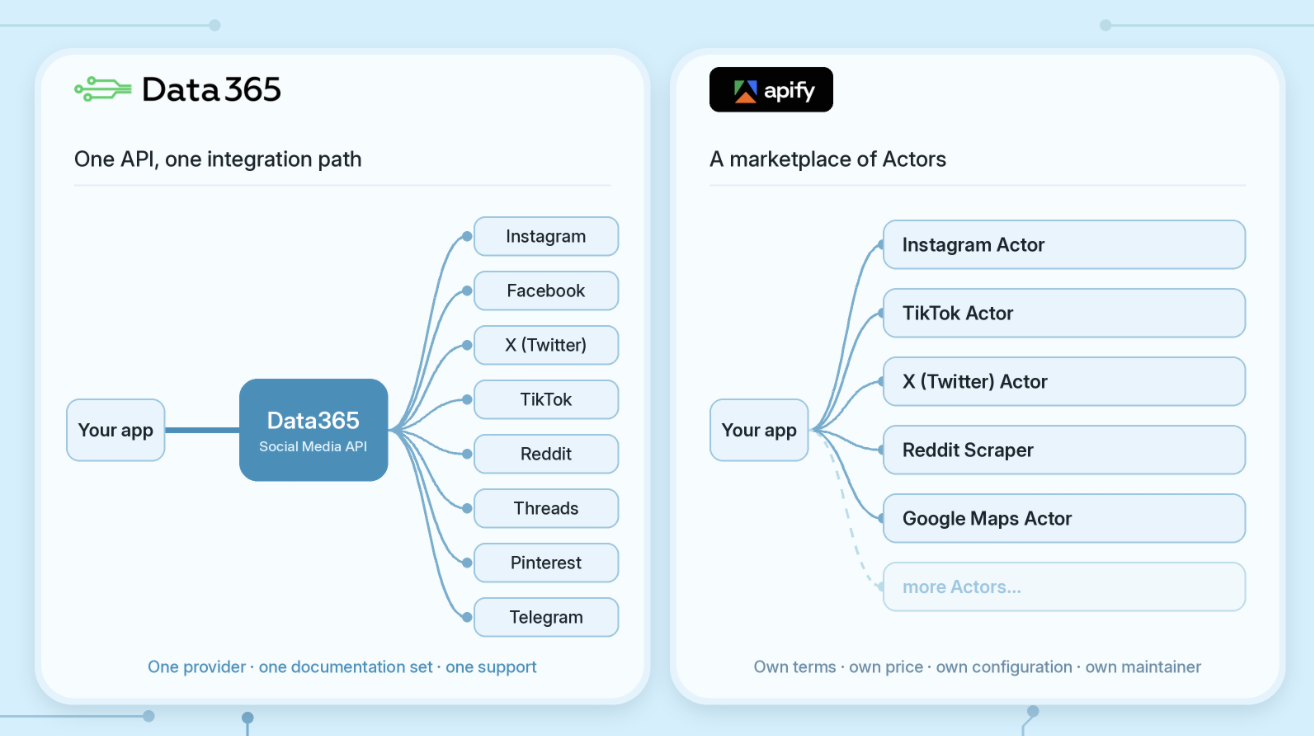
Data365 has focused exclusively on social media data since 2018. Our Social Media API grants access to public data through the same integration path to such platforms:
Data is collected live at the moment of the request rather than served from a cache, so you receive fresh information and decide what to collect, when, and how often. In addition, all your operations are backed by an expert technical team that maintains the product.
Apify: a marketplace of Actors
Apify has at its core the Apify Store. According to its documentation, the Store holds thousands of Actors, and most of them are created and maintained by community developers rather than by Apify itself. Along with social networks, users can also fetch search engines, maps, e-commerce platforms, etc.
This marketplace model gives Apify breadth, but also brings complexity, as each scraper has its own set of features, use terms and cost.
Why the difference matters
On Apify, getting social data starts with choosing an Actor, and every Actor comes with its own inputs, outputs, pricing, and maintainer. A project that spans three social networks can mean evaluating and maintaining three separate tools. With Data365, the choice is made once: one provider, one documentation set, and one support for every supported network.
Data365 vs Apify: Feature Comparison
The table below summarizes how the two approaches differ across the factors that matter most when you plan a recurring data pipeline.
At its core, it's a question of choice: do you need access to a wide range of web sources, or do you want a single stream of public data from social media? The next section explains how Data365 works, from the initial call to the final JSON.
How Data365 Works
Data365's Social Media API is built for teams that need social data flowing into their products, dashboards, or research pipelines on a regular schedule. In other words, teams that need a single API connection with a consistent retrieval workflow across supported networks.
Introductory call with tech expert
After you’ve planned a call, you’ll have a short conversation with our team so we can better understand the networks, endpoints, and volumes you need and come up with the best offer. Then you’ll get a personal API key, docs, and a Postman collection to test requests before production during a 14-day free trial, with no credit card required.
Data endpoints we do support
Social Media API only fetches public information that can be reached without signing in. This might be:
- Profiles: public account details, follower counts, and other supported profile fields.
- Posts: text, available media information, timestamps, and public engagement counters.
- Comments: publicly accessible comment text and related fields, where supported.
- Search: supported keyword or hashtag queries, with network-specific restrictions.
For more detailed information, clients can check documentation created for each network specifically, as fields vary by network and endpoint. This will help to define your collection scope more precisely.
A three-step retrieval workflow
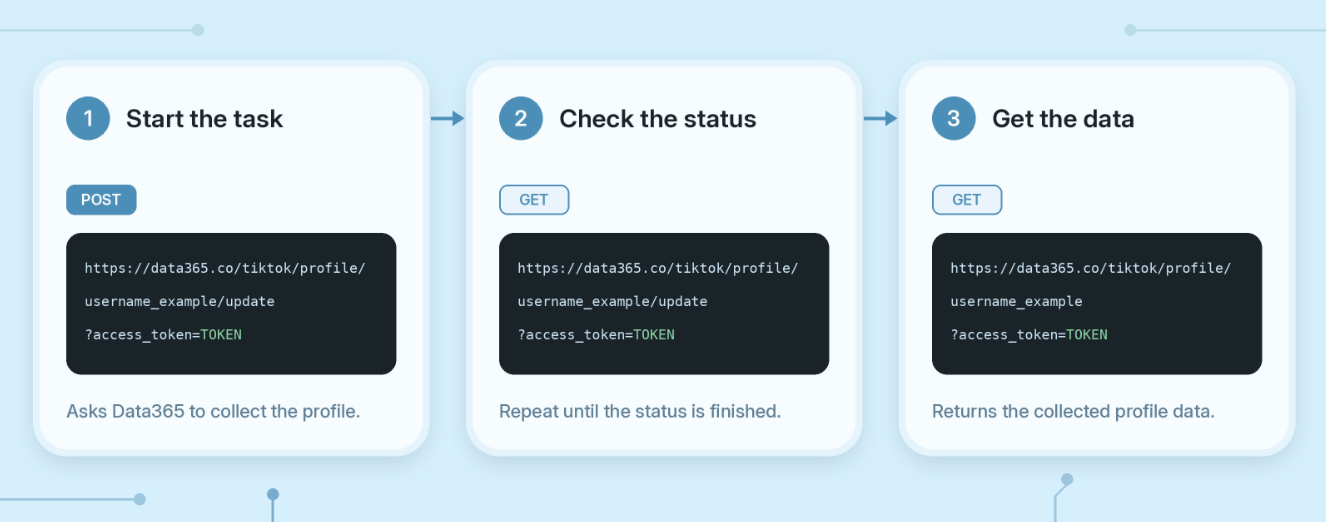
Every supported network follows the same request logic. The workflow has three steps:
- Start collection: A POST request starts a collection task using an endpoint supported for your selected network.
- Check status. Send a GET request to see if the collection task is complete.
- Retrieve results. A final GET request returns structured JSON, with network-specific fields where platforms differ.
When you add another supported network, you can reuse the request workflow while adapting its parameters and returned fields.
Support and customization
If you have questions about setup, integration, or data availability, you can always contact our support team via email. In case your project requirements exceed our offer, you may also discuss available customization options. All that’s needed is to fill out a short form and schedule a call to get in touch with our experts.
How Apify Works
To start a process, trigger a scraper run from the Apify Console, API, CLI, schedule, or integration. Apify verifies the request, queues the run, and runs it in an isolated compute environment. The scraper then reads its JSON input (which usually includes start URLs, limits, and extraction rules) and puts the URLs into a persistent request queue.
Then it pulls a URL from the queue, fetches the page, and executes a JavaScript function. That function filters the desired fields and returns them as structured records. If set up, it searches for links matching allowed patterns, adds unvisited links back to the queue, and continues the loop until the queue is empty or the limits are reached.
Returned requests are added to the default dataset. Results like files, HTML, or other non-tabular outputs can be directed to a key-value store. The dataset can be viewed in Apify, downloaded as JSON, CSV, or Excel, or programmatically accessed via the API using the dataset ID.
Data365 and Apify Pricing: How Each Model Builds Your Budget
Pricing is where the two approaches diverge most. Data365 charges for data, measured in credits. Apify charges for usage, and what counts as usage depends on the Actor you run.
Data365: a fixed monthly credit allowance
Each Data365 subscription plan includes a monthly credit allowance and a set number of social networks. The plans are:
- Basic: €300/month for 1 social network and 500,000 credits
- Standard: €850/month for 3 social networks and 1,000,000 credits
- Custom: negotiated pricing for up to 8 networks and up to 100,000,000 credits
Credit values are fixed per request type: 1 credit/post, 5 credits/post with comments, 7 credits/search request, and 9 credits/profile. To estimate a budget, multiply the records you need by their credit value and pick the plan that covers the total. Infrastructure costs are not passed through as separate line items.
Apify: subscription credit plus Actor pricing
Apify’s paid plans include prepaid usage equal to the subscription fee: Starter at $19/month, Scale at $199, and Business at $999. A Free plan includes $5 of monthly usage. Consumption beyond the included credit is billed pay-as-you-go, and compute is priced from $0.20 per compute unit (CU) on Starter to $0.13 on Business.
The final bill also depends on which of three pricing models the chosen Actor uses:
What this means for forecasting
With pay-per-event Actors, forecasting is straightforward: multiply results by the event price. With usage-based Actors, the bill depends on how long a run lasts, how much memory it uses, and how much traffic it routes. For instance, one compute unit equals 1 GB of RAM for one hour, and residential proxy traffic costs $8 per GB on Starter. With Data365, the estimate depends only on the data you request.
Cost Scenarios: Instagram Profiles and Posts
Numbers make the difference concrete. For the two scenarios below, we compare Data365 with Apify’s Instagram Scraper (apify/instagram-scraper), an Apify-maintained Actor that charges per result with platform usage included. Its published price per 1,000 results is $2.70 on Free, $2.30 on Starter, $1.90 on Scale, and $1.50 on Business.
Trial run: 2,000 public Instagram profiles
Imagine a team that wants profile information for 2,000 public accounts, without posts or comments, before committing to a provider. Here is how each free option handles the task:
- Data365: 2,000 profiles × 9 credits = 18,000 credits. During the 14-day free trial, you can test the data on your own use case. The scope is agreed on the introductory call.
- Apify Free plan: 2,000 results × $2.70 per 1,000 = $5.40. That exceeds the $5 monthly credit, so completing the task within one billing cycle requires a paid plan.
Either way, this little test only determines if the data is suitable for your purposes. Once the project enters production, the cost question arises, as it does in the next scenario.
Monthly pipeline: 400,000 public Instagram posts
Now the same team moves to production and collects 400,000 public posts per month, without comments. The table shows the estimated monthly bill on each option:
Data365’s Basic plan covers the entire workload and leaves 100,000 credits for other requests on the same network. The lowest Apify bill in this scenario, on Scale, is $760, with $561 of it in overage. Because the prices are in different currencies, a percentage comparison would depend on the exchange rate, but the gap is clear: €300 would only equal $760 at a rate above $2.53 per euro.
Data365 or Apify: Which One Fits Your Project?
Both tools are legitimate choices, and the right one depends on what your team is building. If social media data is the core of your product or research, a dedicated API usually means less maintenance and more predictable costs. If social media is one source among dozens, a general platform may be the better fit.
Choose Data365 if you:
The strongest case for Data365 is a recurring pipeline built around social networks. It fits teams that:
- collect public data from Instagram, Facebook, X (Twitter), TikTok, Reddit, Threads, or Pinterest on a regular basis
- want one integration and one request logic across every network they use
- prefer budgeting by data volume instead of compute, proxies, and storage
- value direct support from the team that runs the API, including custom endpoints
Consider Apify if you:
Apify’s marketplace model works well in different circumstances. It may suit teams that:
- need data from many non-social sources, such as maps, search engines, or online stores
- want to build, host, and publish their own scrapers
- run small, occasional jobs that fit within a free or entry-level usage allowance
Ready to test Data365 on your own use case? Plan a call with us to start a 14-day free trial.
Extract data from top social media networks with Data365 API
Request a free 14-day trial and get 20+ data types


